
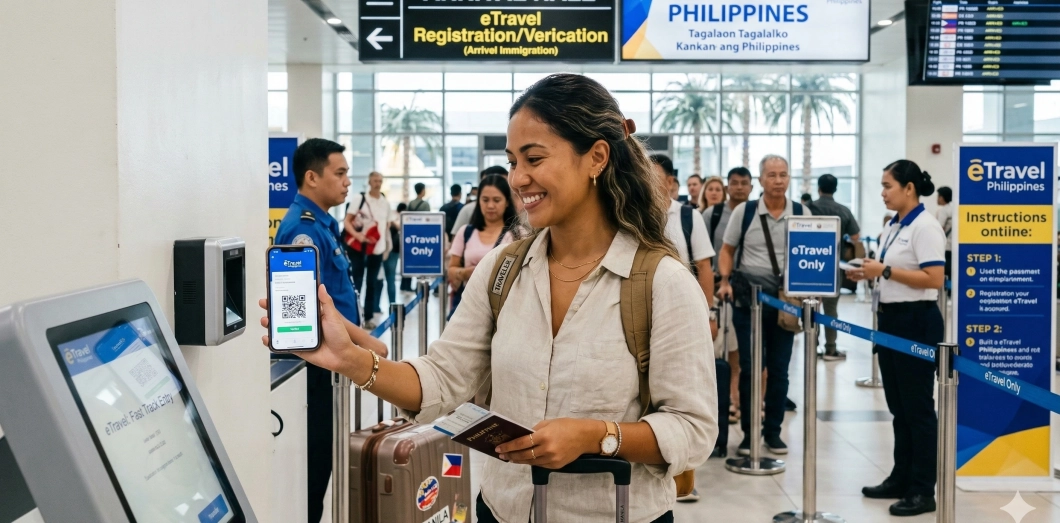
Step-by-Step Guide: How to Register in eTravel Philippines (2026)

Step by Step Guide How to Register in eTravel Philippines 2026
Border Clearance Guide • Bureau of Immigration & Quarantine • 2026 Official Protocol

The Philippine eTravel System is the mandatory digital platform required by the Philippine government for all inbound and outbound international travelers. Completely replacing the legacy paper arrival cards and health declaration sheets, this single digital clearance coordinates immigration, customs, quarantine, and health screening across all Philippine air and sea ports.

🛡️ Registration is 100% FREE of Charge

You must register within 72 hours prior to your scheduled flight arrival or departure. The Philippine government never charges any fees for eTravel registration.

⚠️ Warning: Avoid fraudulent copycat websites that charge credit card fees or processing commissions. Use only the official government domain: https://etravel.gov.ph.

Who Needs to Register in eTravel?

🛬 Inbound to the Philippines

Mandatory for ALL passengers: Both Filipino citizens (tourists, OFWs, dual citizens) and foreign passport holders must complete registration prior to boarding their flight into the Philippines.

🛫 Departing the Philippines

Mandatory for Filipino citizens: All departing Philippine passport holders must submit departure declarations. Foreign travelers leaving the country are exempt from departure eTravel.

Step-by-Step Registration Process

1
Access the Official Government Portal Open your browser and navigate directly to https://etravel.gov.ph (or the official eGov PH super-app).
2
Select Entry Type (Arrival vs. Departure) Indicate whether you hold a Philippine or Foreign passport, choose your mode of transit (Air or Sea), and select your travel direction.
3
Provide Personal & Passport Details Input your full name as spelled in your passport, date of birth, nationality, gender, mobile number, active email, and passport number. Ensure your date of passport issuance and personal selfie/photo are ready if prompted.
4
Enter Flight & Itinerary Data Specify your airline, exact flight number (e.g., PR 102, 5J 804), date of travel, port of arrival/departure, seat assignment (if known), and country of origin or destination.
5
Provide Destination Accommodation Address For Filipino residents, enter your home address. For visiting foreign tourists and exchange students, input your confirmed hotel, university accommodation, or private host address.
6
Complete the Health & Customs Declaration Answer the brief health screening questions regarding communicable illness symptoms and countries visited within the last 30 days. Complete the integrated electronic customs declaration if carrying dutiable or declarable goods.

Understanding Your Generated eTravel QR Code

Upon clicking submit, the system instantly generates a personal digital QR code on your screen:

GREEN QR CODE
Express Lane Cleared

Your declaration is complete and poses no quarantine alerts. You are pre-cleared for express scanning at immigration biometric e-gates and health checkpoint scanners.

RED QR CODE
Manual Verification Required

Indicates incomplete documentation, travel to high-risk health jurisdictions, or active declared health symptoms. Proceed to the Bureau of Quarantine (BOQ) counter at the airport for brief manual assistance.

Essential Tips for Airport Presentation

✔ Always Save an Offline Screenshot: Take a high-resolution screenshot of your QR code on your smartphone immediately after submission. Terminal Wi-Fi or cellular roaming may experience temporary dead zones.
✔ One QR Code Per Family Member: Each individual traveler—including infants and children—must possess their own registered profile and unique QR barcode.
✔ Show at Check-In & Gate: Airline ground agents abroad will ask to verify your green QR code prior to issuing boarding passes to Manila, Cebu, or Clark.

Official Exemptions: Holders of diplomatic or official passports, accredited foreign diplomats, and 9(e) visa holders are exempt from standard eTravel declarations in accordance with international consular protocols.

Organizing an Institutional Flight or Group Tour?

Primary Tours & Travel, Inc. conducts pre-flight document processing, eTravel assistance, and full airport ground coordination for schools, university exchange delegations, and corporate travel groups.

Contact Our Airport Coordination Desk
You May Also Like

Image
Office Address
#5 Princeton Street, 15th Avenue,
Brgy. San Roque, Cubao, Quezon City,
Philippines, 1009

customercare@primarytours.com
salesgroup@primarytours.com

+63920 9090813
+632 70000693

Follow Us

OUR SERVICES OFFERED
COMPANY & SUPPORT